Query Suggestion vs Place Suggestion in Autocomplete | TTA ACADEMY
Autocomplete
Officially Verified· Sep 16, 2026
Query Suggestion vs Place Suggestion in Autocomplete
Learn how text-based query suggestions differ from specific place suggestions, how location context affects usefulness and which evaluation mistakes to avoid.
An autocomplete list can contain more than one kind of suggestion. Some options complete the user’s text into a broader search, while others identify a specific business, landmark or location. Recognising the type first makes the usefulness decision clearer and prevents full map-search rules from being applied to the wrong workflow.
Why suggestion types matter
Search suggestions are recommendations displayed while a user types. They reduce typing effort and can help users express what they want more precisely. A dropdown may combine text queries with richer items such as categories, products or specific entities, so visual appearance alone is not a universal definition.
What is a query suggestion?
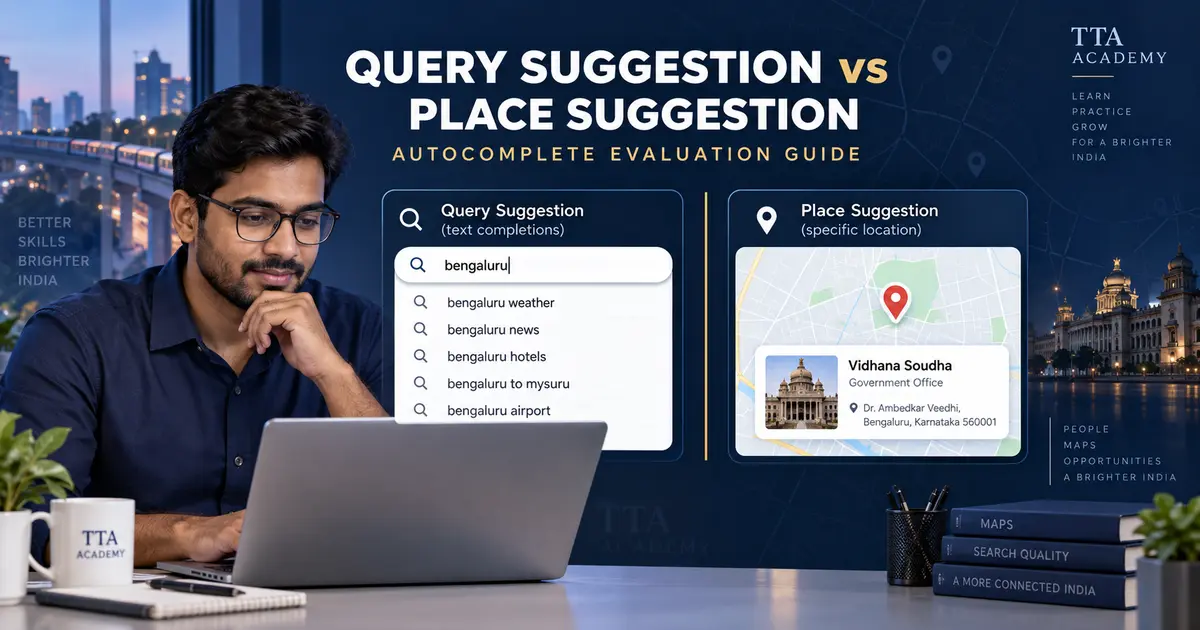
A query suggestion completes or reformulates the text being entered. For example, bengaluru may produce bengaluru weather or bengaluru airport. The suggestion expresses a search rather than identifying one confirmed place record. Evaluate whether it is a plausible, useful continuation of the typed characters and intent.
What is a place suggestion?
A place suggestion identifies a particular physical entity, such as a named branch, landmark, station or institution. It may include a pin icon, category or address snippet, but interface signals differ between systems. Confirm the suggestion type from the active instructions and the information presented—not from one icon alone.
Differences at a glance
Query suggestions usually represent phrases and exploratory searches. Place suggestions represent specific entities and often support navigational intent. Both can appear in the same dropdown. Selecting either may lead to different experiences depending on the product, so do not assume that every query must open a results list or every place must open a map marker.
How location changes the evaluation
An explicit location written in the query is normally a strong intent signal. Implicit context may come from the user location or active map viewport when the project supplies it. The active guideline determines how freshness, distance and popularity should be balanced.
Common evaluation mistakes
Common errors include treating autocomplete like Task Search 2.0, assuming all short queries have local intent, ignoring an explicit location, penalising accepted name variants and relying only on capitalisation or icons. Another mistake is judging a suggestion by personal preference instead of the likely user intent.
Final checklist
Identify the suggestion type, read the exact typed text, determine likely intent, check explicit and supplied implicit location signals, assess semantic usefulness and apply only the active autocomplete labels. Record uncertainty rather than inventing missing context.
FAQ
Frequently Asked Questions
How TTA Academy Can Help
TTA ACADEMY is an independent training and career guidance platform — not affiliated with or endorsed by any vendor named on this page. We don't guarantee opportunities, approval, project allocation, or income, and we don't issue certificates. What we do offer:
Trainers, Mentors & Career Consultants · TTA ACADEMY
Articles on this platform are researched, written and reviewed by the TTA ACADEMY team — a group of trainers, mentors, quality specialists and remote-work consultants supporting learners in AI, freelancing, vendor qualification and remote career development.
We link only to official websites, government portals, research papers, official documentation, academic publications, industry reports and vendor documentation.
Disclaimer: Information changes over time. TTA ACADEMY is an independent training and career guidance platform — we are not affiliated with or endorsed by any vendor unless explicitly stated. Always verify the latest details directly from the official vendor resources linked on this page.