More guides
 Career Guidance
Outlier AI: A Beginner’s Guide to Starting Remote AI Work
Read guide Career Guidance
Is CrowdGen by Appen Legit? What We Verified
Read guidePopulii is a global crowdsourcing platform where contributors can work on AI-driven projects and other digital-work opportunities. The Populii Community describes the platform as a community of on-demand talent working with AI-driven projects. Project access, language requirements, qualification and task availability can vary by user and project.
What Populii is — and what the New Ratings project involves
The supplied New Ratings onboarding material describes a ratings workflow in which contributors review outputs such as text or images, evaluate them against defined guidelines and provide a judgment in the required format. Tasks are assigned according to the language specified in the contributor's Populii profile.
Before you start: prepare accurate information
Keep your real name, active email address, current country and city, genuine language information and accurate skills ready. If you plan to complete the skills section, keep a current resume and LinkedIn profile available. Do not add a language, qualification or skill simply because you think it will improve project matching.
Step 1: Create your Populii account
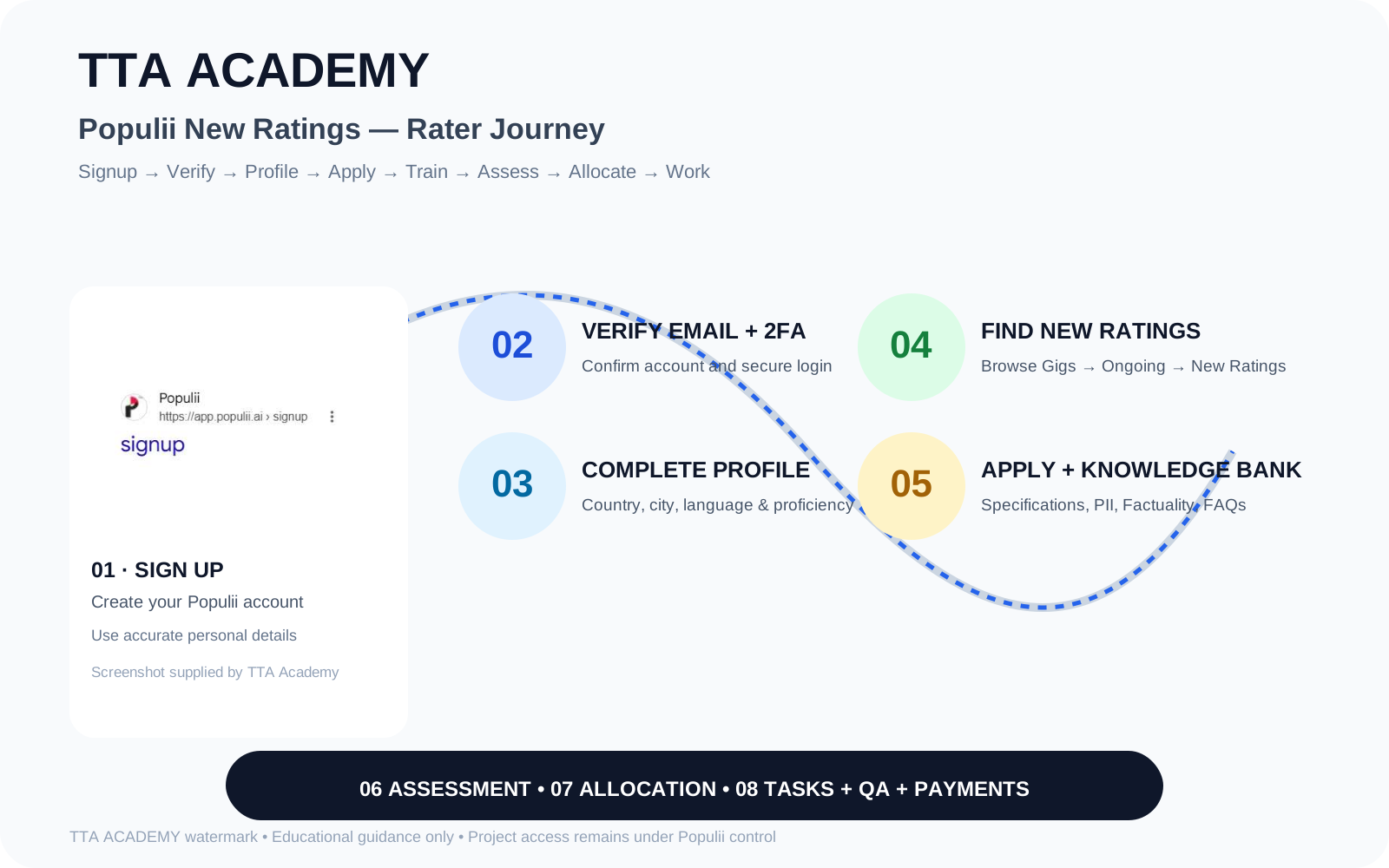
Open the official Populii signup page. The signup form shown in the supplied screenshots asks for First Name, Last Name, Username, Email, Password and Confirm Password. You also need to accept the required policies and complete the reCAPTCHA.
Step 2: Complete your basic profile
The registration flow shown in the screenshots asks for Country, City, Gender, Language and Language Proficiency. Complete these fields accurately. For the supplied New Ratings project, the onboarding material says the profile should contain only the language native to the country of residence and a maximum of two languages — Native and Preferred — and that language preferences are mandatory for consideration.
Step 3: Verify your email and enable 2FA
After registration, Populii sends a confirmation email. Open the email and click Confirm account. After email verification, sign in to Populii. The signup flow may then ask you to enable two-factor authentication using an authenticator app.
For 2FA, install Google Authenticator, Microsoft Authenticator or another supported authenticator app, scan the QR code shown by Populii, then enter the six-digit code displayed by the app. Populii's current FAQ says the code should be entered within the code window shown by the authenticator.
Step 4: Complete skills and ID verification
Populii's profile flow can include a Skills section, LinkedIn profile and Resume upload. Add only genuine skills. A completed profile can improve the information available for project matching, but it is not a guarantee of allocation.
The supplied New Ratings onboarding material states that contributors should be ID verified on Populii before working on the project. Complete the official ID-verification flow carefully and make sure your profile information is accurate.
Step 5: Find the New Ratings gig

After signup and profile setup, open the Populii dashboard and go to Browse Gigs. The supplied New Ratings onboarding material instructs contributors to open Ongoing Gigs and select New Ratings. Review the Specifications tab carefully and, if you meet the requirements, use Apply.
The same onboarding material directs contributors to the Training materials and Knowledge Bank. For New Ratings, it lists PII Guidelines, Factuality Guidelines and FAQs as documents to review before the assessment.
Step 6: Prepare for and take the New Ratings assessment
After applying, the New Ratings gig should appear under My Gigs. Complete the associated assessment only after reviewing the current Knowledge Bank material.
The supplied New Ratings onboarding document specifies a minimum score of 80%, two attempts, and a time-bound assessment consisting of 20 questions with a 60-minute time period.
The New Ratings journey continues after the assessment: your application can remain In Progress until the gig is allocated. Once allocated, the status changes to Allocated. Allocation does not necessarily mean tasks are immediately available; monitor your registered email and relevant Populii forums for task announcements.
Step 7: After the assessment — allocation and work
According to the supplied onboarding material, after passing the assessment you receive an email from Populii about the timeline for gig allocation. Your application can remain In Progress until the gig is allocated. Once allocated, the status becomes Allocated.
Allocation does not necessarily mean that tasks will be immediately available. The project material says workers should monitor their registered email and relevant forums for task announcements. It also states that language-specific task availability can be first-come, first-served.
Quality and Average Handling Time (AHT)
The supplied Ratings Project material states that contributors must maintain a 95% or higher quality rating. It also explains that Average Handling Time varies by task and that the applicable target is provided with the task notification.
The practical rule is simple: follow the task-specific instructions, keep your judgments accurate and pay attention to the AHT target shown for that task. Do not assume that one AHT applies to every New Ratings task.
Payment information
Payment terms are project-specific. The supplied New Ratings material says payments are processed by Populii through its payment providers and describes quality/AHT-related factors in the payment calculation.
Populii's current FAQ says payments are processed on the second and last Wednesday of each month. It currently lists Payoneer and Airtm as payment providers, subject to availability in the contributor's country. Always check the payment information shown for your specific project and account.
Common beginner mistakes
Avoid creating duplicate accounts, adding fake languages or skills, skipping the Knowledge Bank, rushing the assessment, ignoring task-specific AHT, sharing account credentials, or assuming that allocation automatically means continuous work.
🔐 New Ratings Assessment Answer Sheet
TTA ACADEMY has prepared a separate 20-question New Ratings answer sheet containing the questions and options with the answer reference provided separately for study and preparation. The resource is an independent TTA ACADEMY preparation material, not an official Populii document.
🎓 TTA Academy New Ratings Training Program
For learners who want structured preparation, TTA ACADEMY provides independent training and guidance around the New Ratings workflow. Training can cover account/profile orientation, project guidelines, assessment preparation, practical examples, workflow understanding, quality expectations and AHT awareness.
Official Populii resources
Before applying or starting an assessment, check the latest information in your Populii dashboard and official Community resources because project requirements, payment terms and task availability can change.
Frequently Asked Questions
TTA ACADEMY is an independent training and career guidance platform — not affiliated with or endorsed by any vendor named on this page. We don't guarantee opportunities, approval, project allocation, or income, and we don't issue certificates. What we do offer:
Articles on this platform are researched, written and reviewed by the TTA ACADEMY team — a group of trainers, mentors, quality specialists and remote-work consultants supporting learners in AI, freelancing, vendor qualification and remote career development.
View Team ProfileReferences & Sources
We link only to official websites, government portals, research papers, official documentation, academic publications, industry reports and vendor documentation.
- Populii Signup — Populii · Official signup
- Populii Community — Populii · Official community
- Populii FAQ — Populii · Official FAQ
- Populii Code of Conduct / Terms
Disclaimer: Information changes over time. TTA ACADEMY is an independent training and career guidance platform — we are not affiliated with or endorsed by any vendor unless explicitly stated. Always verify the latest details directly from the official vendor resources linked on this page.
